Sound
Syntax
Sounds are created using the snd and csnd constructors. Like all constructors in Terracotta, the values passed into the constructor are Expressions and can take full advantage of their features.
snd(sound: str, volume?: num, pitch?: num | str, variant?: str)

csnd(sound: str, volume?: num, pitch?: num | str)
pitch can be a number from 0.5-2, or it can be a note name. pitch is optional and defaults to 1 if omitted.
Click to view all valid note names and their pitches
| Note | Equivalent Pitch |
|---|---|
"F#0" |
0.5 |
"Gb0" |
0.5 |
"G0" |
0.529732 |
"G#0" |
0.561231 |
"Ab1" |
0.561231 |
"A1" |
0.594604 |
"A1" |
0.594604 |
"A#1" |
0.629961 |
"Bb1" |
0.629961 |
"C1" |
0.707107 |
"C#1" |
0.749154 |
"Db1" |
0.749154 |
"D1" |
0.793701 |
"D#1" |
0.840896 |
"Eb1" |
0.840896 |
"E1" |
0.890899 |
"F1" |
0.943874 |
"F#1" |
1.0 |
"Gb1" |
1.0 |
"G1" |
1.059463 |
"G#1" |
1.122462 |
"Ab2" |
1.122462 |
"A2" |
1.189207 |
"A#2" |
1.259921 |
"Bb2" |
1.259921 |
"B2" |
1.33484 |
"C2" |
1.414214 |
"C#2" |
1.498307 |
"Db2" |
1.498307 |
"D2" |
1.587401 |
"D#2" |
1.681793 |
"Eb2" |
1.681793 |
"Eb2" |
1.681793 |
"E2" |
1.781797 |
"F2" |
1.887749 |
"F#2" |
2.0 |
"Gb2" |
2.0 |
volume is optional and defaults to 2 if omitted.
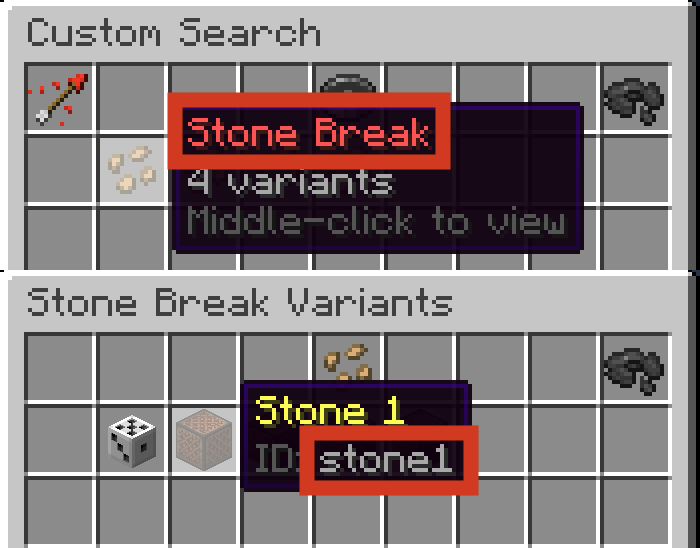
To play a random variant every time, omit the variant argument.
When using the snd constructor, sound is the sound's minecraft id that would be used in a /playsound command, and variant is the ID that appears in the button's lore.
When using the csnd constructor, sound is the minecraft id of the sound that would be used in a /playsound command. This allows the use of custom sounds provided by a plot resource pack.
Operations
+ (Addition)
txt + snd: txt
Stringifies the Sound then adds it onto the Styled Text.